


Car Home Ultra
3.52.16K Reviews
App Specs
- Version
- 4.94
- Updated On
- License
- Free
- Downloads
- 1,000,000+
- Developer
- TheSpinningHead
- Categories
- Auto & Vehicles
- Platform
- Android
Screenshots
 Analysis by AppCompare
I judge a driving app by what happens between leaving home and arriving: can I find the control I need without digging through a phone, and does the setup still make sense once navigation, audio, and calls each involve a different app? Car Home Ultra is built around that handoff. It gives an Android phone a car-oriented home screen, and I find the idea most useful when I want a few familiar controls in one place rather than another full driving platform.
Before pulling away: choosing the right starting point
The practical benefit starts before the car moves. I would arrange the screen while parked, putting only the navigation, audio, and contact shortcuts I genuinely use in easy reach. That small bit of preparation matters: a screen crowded with options can recreate the very searching the app is meant to reduce. I’d also try the layout in daylight and after dark so the controls feel legible in both conditions.
This is an Auto & Vehicles app from TheSpinningHead, and its approach is more like a configurable launch pad than a replacement for every app in the car. That distinction is useful when deciding whether it fits your routine. It can bring selected destinations within reach, but the navigation or music service you choose still handles its own core job.
A sensible setup for a real commute
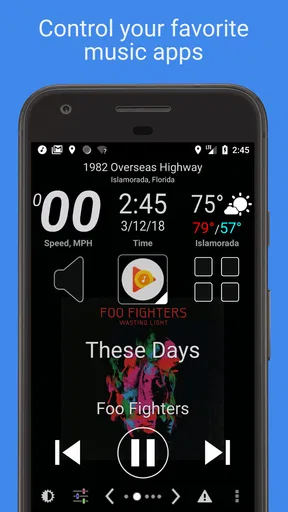
For a weekday drive, I’d put my usual map app, preferred music app, and a frequently called contact where I can reach them quickly, then leave less-used tools off the main screen. If I need to change the destination, the goal is to make the handoff to navigation straightforward; when I want audio, I can open the player I already know. This is a more practical workflow than trying to operate several small icons scattered across a regular phone home screen.
There is a trade-off in that simplicity. A shortcut can get me to another app, but it does not make that app’s controls safer or easier once I have handed over to it. I would set up destinations and playlists before driving, and treat voice control as a convenience rather than permission to handle complicated tasks on the move. The safest workflow is still to make adjustments while parked.
Where the handoffs help—and where they do not
The app’s voice-command idea is appealing for calls, texts, and directions, especially when I want to avoid searching manually. In practice, voice recognition can stumble over a complicated request or an unfamiliar name. I’d keep requests short, check the result before setting off, and avoid relying on a spoken command that needs repeated correction while the car is moving.
Car Home Ultra is most compelling if you already have navigation and audio apps you like and want a more driving-friendly way to reach them. If you want a complete in-car system with a single interface controlling everything, this is a different proposition: its value is in organizing access, not making every service behave as one. Drivers who rarely use their phones in the car may also find that a normal home screen is sufficient.
Worth Reading Before You Choose

EA SPORTS FC Mobile 26 Is a Bigger Football Game, but It Takes Time

Flipboard Shows What News Apps Must Do Beyond the Feed

Switching to Android Auto Means Rethinking Your Driving Routine

Google Calendar Makes a Crowded Week Easier to Manage

Ludo King Makes the Most of the Minutes Between Plans

Baby Panda World Brings Quick Play to Modern Phones, but Its Game Library Feels Busy
What to expect from the app
The app is free to download, with in-app purchases ranging from $1.99 to $14.99 per item. It has a 3.5 average from around 12,000 ratings, and more than one million installs. Those figures suggest a well-established option, but they are not a promise that its layout or voice workflow will suit every driver. It is rated for Everyone, and the current version is 4.94.
Car Home Ultra dates back to October 1, 2010, so it is a long-running app rather than a new take on the driving dashboard. It requires Android 5.1 or later. I would check that requirement before planning a setup on an older device, and keep expectations grounded: compatibility with an operating system is not the same thing as a guarantee that every phone, car, Bluetooth connection, or third-party app will behave identically.
Making the most of its dashboard
One useful detail is to think of customization as a safety decision, not just a cosmetic one. I’d put the actions I use most in consistent positions and avoid rearranging the screen often; muscle memory is more valuable behind the wheel than a clever layout. Weather, speedometer, and compass widgets can be handy context, but they should earn their space. If they make the screen busy, I’d remove them and keep the controls I actually need.
Bluetooth auto-launch can make the start of a trip smoother when the phone connects to the car, but it is worth testing the complete sequence while parked. Confirm that the expected screen appears and that the desired shortcut opens the right app. If the connection is inconsistent, launching the dashboard manually may be less frustrating than assuming every trip will start automatically.
Simplifying Your Drive
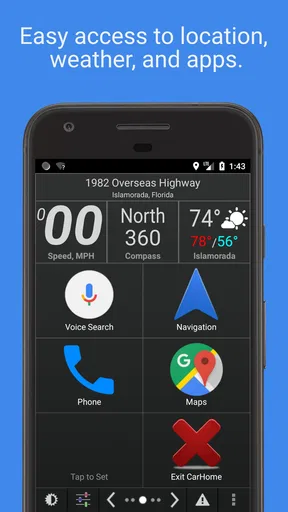
First impressions matter, and Car Home Ultra doesn’t disappoint. As soon as you launch the app, you're greeted with a clean and straightforward interface. It’s designed to make your driving experience safer and more convenient by offering quick access to essential features. Think of it as your phone's version of a car's dashboard.
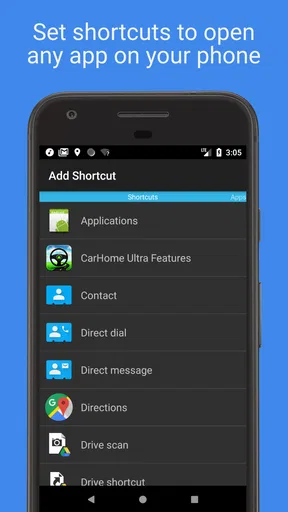
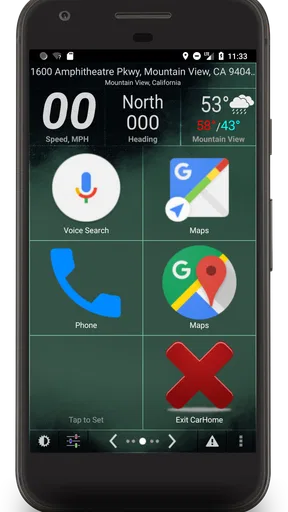
The app’s home screen is fully customizable. You can choose which apps and shortcuts appear, making it easy to access your favorite navigation apps, music, and contacts. No more fumbling around trying to find that one app while on the road!
Voice Commands and Hands-Free Operation
One of the standout features of Car Home Ultra is its voice command capabilities. You can initiate calls, send texts, or even get directions without taking your hands off the wheel. It’s like having a co-pilot who listens to you—only better because they don’t argue back!
The voice recognition isn't perfect, but it's surprisingly accurate. I tested it out by asking for directions to a few different places, and it got me where I needed to go with minimal fuss. The app integrates seamlessly with Google Maps, so you're in good hands navigation-wise.
Performance and Compatibility
In terms of performance, Car Home Ultra runs smoothly on both Android and iOS devices. I used it on my Android phone, and it didn’t slow down or crash, which is crucial when you’re relying on it for navigation. The app also supports Bluetooth connectivity, so it automatically launches when you connect your phone to your car's Bluetooth system.
Compatibility-wise, the app works with a wide range of devices and car models. Whether you have the latest flagship phone or a few years-old model, you should be able to use Car Home Ultra without any issues.
Customizable Widgets and Shortcuts
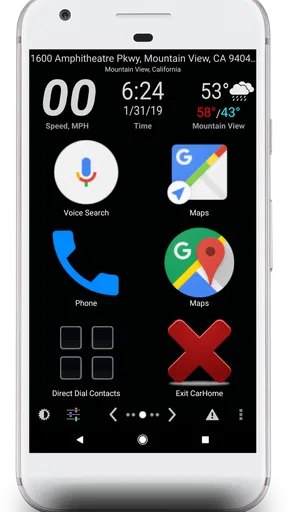
Customization is a big deal with this app. You can add widgets for weather updates, speedometer, compass, and more. The layout is flexible, allowing you to arrange everything just the way you like it. This personalization makes it feel like you have a tailor-made dashboard.
Setting up shortcuts is a breeze. I added my most-dialed contacts and favorite music apps, so they’re just a tap away. This kind of convenience is what makes Car Home Ultra a game-changer for frequent drivers.
Safety First
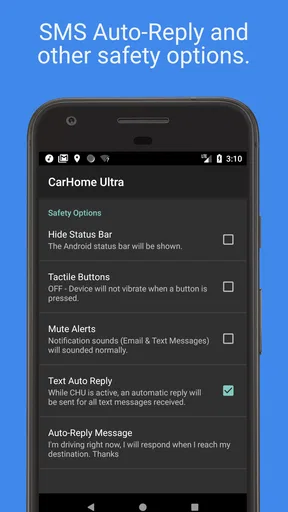
Safety is a priority here. The app's large buttons are designed to be easy to tap, reducing the risk of accidents. The voice command feature further reduces distractions, letting you keep your eyes on the road and hands on the wheel.
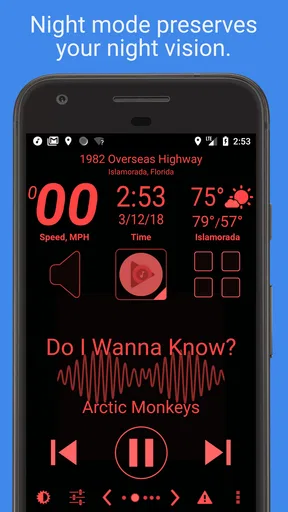
Additionally, Car Home Ultra automatically switches to night mode when it gets dark, which is a nice touch. This feature prevents the screen from being too bright and distracting during nighttime drives.
Final Thoughts
Overall, Car Home Ultra is a fantastic app for anyone who spends a lot of time driving. It combines functionality with ease of use, making your phone an invaluable companion on the road. While it’s not perfect—voice recognition can sometimes falter, especially with complex requests—it’s still a huge step towards safer, hands-free driving.
If you’re looking to enhance your driving experience, give Car Home Ultra a try. With its customizable interface and robust features, it’s sure to make your time behind the wheel more enjoyable.
When another option is the better fit
If your car already has a dashboard interface that you find easy to use, adding a separate phone dashboard may be unnecessary. Likewise, drivers who want voice navigation above all else may prefer to open their navigation app directly and keep the number of handoffs small. Car Home Ultra makes more sense when the recurring annoyance is finding the right phone shortcut, not when the real problem is a navigation app or car system that already works well.
I’d also be cautious about treating a large button as a safety guarantee. It can reduce the effort of locating a control, but any interaction can still distract. I’d use the app to prepare a cleaner starting screen, not to encourage browsing while moving. If a call, message, or route change needs attention, pulling over is the sensible choice.
My take after looking at the whole trip
As a driving companion, this is a focused utility rather than an all-in-one cockpit. Its strongest case is a driver who regularly switches between familiar phone apps and wants a predictable place to launch them. Its weaker case is someone expecting a seamless replacement for a built-in infotainment system, or anyone who dislikes setting up a screen before using it. The free download makes it easy to try the basic approach, while the listed in-app purchases mean I’d check what is included before deciding to spend.
My practical recommendation is to configure it at home, test the Bluetooth handoff in the driveway, and take a short, familiar route before depending on the setup for a longer trip. Keep the front screen sparse, use brief voice requests, and judge the app by whether it reduces fiddling at the start of a drive. If it does, it has a clear job in your routine; if it adds another layer to manage, your regular navigation app or car dashboard may be the simpler choice.
Pros
- Customizable dashboard layout
- Voice command support
- Integrates with navigation apps
- Speed and location alerts
- Automatic day/night mode
Cons
- Some features require payment
- Interface feels slightly dated
- May consume more battery
- Limited theme options
- Occasional GPS signal loss
FAQs for Car Home Ultra
What features does Car Home Ultra offer for drivers?
Car Home Ultra is designed to enhance the driving experience by providing a customizable dashboard. It offers features like large buttons for easy access, a speedometer, GPS navigation integration, and quick access to music and phone calls. It also includes voice commands for hands-free operation, ensuring a safer driving experience.
Is Car Home Ultra compatible with all smartphones?
Car Home Ultra is compatible with most Android devices. However, compatibility with certain features may vary depending on the device model and operating system version. It’s recommended to check the app’s requirements and user reviews to ensure it works well with your specific smartphone model.
Does Car Home Ultra require an internet connection to function?
While Car Home Ultra can operate without an internet connection for basic functions like speedometer and customizable buttons, some features such as GPS navigation and real-time traffic updates do require an internet connection. For the best experience, a stable connection is recommended.
How customizable is the Car Home Ultra interface?
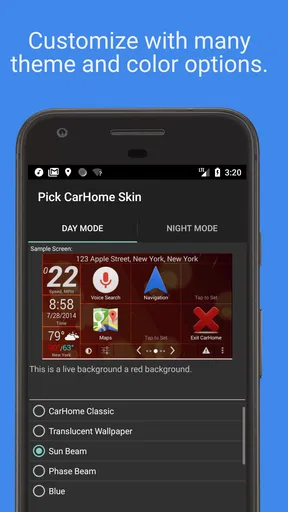
The interface of Car Home Ultra is highly customizable, allowing users to personalize the dashboard to suit their preferences. Users can choose from various themes, alter button sizes, and assign functions to each button for quick access. This flexibility makes it easy to tailor the app to individual driving needs.
Is there a cost associated with using Car Home Ultra?
Car Home Ultra offers a free version with basic features, but to unlock all functionalities, a one-time purchase or subscription may be required. The premium version includes additional features such as more customization options and enhanced voice command capabilities. Users should consider their needs before deciding on the purchase.


